Skip to content

Door two · Rental property management

Manage your rental property. Not more spreadsheets.

Manage properties, tenants and rental payments from Windows or Android — with built-in Rental Income Tax calculations and deadline reminders for Zambian landlords.

Zambia Rental Income Tax Configured for Zambia’s Rental Income Tax rules
Free for 7 days Try AfriLease Pro for seven days with no payment required.
Need the full version? WhatsApp us on 0978 643 800
Watch AfriLease Pro — video: AfriLease Pro — product overview, 45 sec
  • Windows Desktop
  • Android
  • Direct download from Chate

See how AfriLease Pro brings property records, rental payments and Rental Income Tax tools into one landlord workflow.

Sound familiar?

Every month, the same questions

When rent lives in a book or a spreadsheet, the answers take hours to find — and small mistakes cost real money.

  • Rent

    Who has actually paid this month?

  • Arrears

    How much am I owed — and by whom?

  • Tenants

    Which lease expires next?

  • Expenses

    Where did the money go?

AfriLease Pro keeps the answers in one place — on your PC or your phone.

Built for Zambian landlords

Rental income tax — without starting from the calculator every month.

Switch on the Rental Income Tax module and AfriLease Pro works out the tax on the rent you record as received, using the Zambian Rental Income Tax rules configured in the app — and keeps an eye on the return date for you.

  • Zambia Rental Income Tax
  • Optional module
  • Windows + Android
  1. 01 Property Units and property type
  2. 02 Tenant Who pays, and how much
  3. 03 Rent received Payments as you record them
  4. 04 Rental income Totalled for the month
  5. 05 Tax calculated Using the configured rules
  6. 06 Deadline reminder Before the return is due
  • Automatic tax calculation

    AfriLease Pro calculates Rental Income Tax from the rent you record as received, using the configured ZRA Rental Income Tax rules — no separate spreadsheet.

  • Know before the deadline

    The Tax page counts down to the return date. On Android, AfriLease Pro can also remind you on your phone as the date approaches.

  • Estimate before you commit

    A built-in calculator works out the tax on any figure, monthly or annual, for planning and what-if checks.

  • Your rental records and tax calculation together

    Rent payments and the tax on them live in one place, instead of separate books, spreadsheets and calculators.

Built-in estimator

Want to check a figure first?

Use the built-in Rental Income Tax calculator for planning. It works on any amount you type in, monthly or annual, and leaves your rental records untouched — on Windows and Android.

Please note: AfriLease Pro provides Rental Income Tax calculation, estimation and reminder tools based on the tax rules configured in the application. Taxpayers remain responsible for reviewing their information and submitting the required returns and payments to the Zambia Revenue Authority. AfriLease Pro does not file or pay tax on your behalf and is not affiliated with or endorsed by ZRA.

What it does

Everything a landlord tracks, in one place

Built around the jobs you already do every month — just faster, and without the arithmetic.

  • Properties & units

    Register each property and unit with its rent, due day, status and owner.

  • Tenant records

    Name, phone, email, lease dates, agreed rent and deposit — plus notes for ID and next of kin.

  • Rent payment tracking

    Every unit, every month: what is expected, what has been received, and what is unpaid or vacant.

  • Tax module

    Rental Income Tax

    Turn on the tax module and AfriLease Pro calculates Rental Income Tax on the rent you receive, using its configured ZRA rules, counts down to the return date and includes a standalone calculator for planning.

  • Arrears & deposits

    See outstanding rent at a glance, and track deposits held and deductions for tenant damage.

  • Rent reminders

    A reminder a few days before rent is due. On Android, alerts reach your phone even when the app is closed.

  • Expenses & receipts

    Record rates, utilities, security and repairs by category, and produce rent receipts for tenants.

  • Dashboards & reports

    Income, expenses, occupancy, collection rate and growth — updated the moment a payment is recorded.

Built by a cybersecurity company

Security you can check for yourself

  • Password sign-in

    Change the default password on first use. Android adds optional fingerprint unlock.

  • Your records stay on your device

    No cloud account to create — your property records are not sent to us.

  • Verifiable downloads

    Every installer comes only through this page, with its SHA-256 checksum published below.

Windows & Android

Choose your platform

Both versions are downloaded directly from Chate Digital Solutions and both include the free 7-day demo.

v1.0.0 · 47.8 MB

AfriLease Pro for Windows

Manage your rental portfolio, payment records and Rental Income Tax tools from your Windows PC.

  • Full dashboards, monthly summary and reports
  • Rental Income Tax page with calculator and filing countdown
  • Excel and PDF export, printable rent receipts
  • Back up your records to a location you choose
v1.0.0 · 68.7 MB

AfriLease Pro for Android

Keep your rental information and the AfriLease Pro tax tools on your Android phone. No Google Play Store account is required.

  • Rent and tax reminders as phone notifications
  • Rental Income Tax dashboard and calculator
  • Ready-made WhatsApp or SMS messages to tenants — you press send
  • Optional fingerprint unlock

Windows is a trademark of the Microsoft group of companies. Android is a trademark of Google LLC; the Android robot is reproduced or modified from work created and shared by Google and used according to terms described in the Creative Commons 3.0 Attribution License. AfriLease Pro is not affiliated with, or endorsed by, Microsoft or Google.

How it works

From download to your first rent record

  1. 01

    Register & download

    Tell us who you are and choose Windows or Android. Your download is ready straight away.

  2. 02

    Run the setup wizard

    Add your name, currency, property and first unit in a few steps.

  3. 03

    Add tenants & record rent

    Enter each tenant once, then record payments as they arrive.

  4. 04

    See where you stand

    Arrears, reminders, tax and dashboards update as you go.

  5. 05

    Keep it

    Happy after 7 days? WhatsApp us for the full version.

Free for 7 days

Get your free AfriLease Pro demo

Try AfriLease Pro free for seven days. See how it handles your properties, tenant records, rental payments and Rental Income Tax tools before deciding whether the full version is right for you. No payment is required to download the demo.

  • The complete app, with every feature switched on
  • Starts empty — ready for your own properties
  • Windows, Android, or both — your choice
  • Locks after 7 days; the full version is one WhatsApp message away

Register for your free demo

Fields marked * are required.

Zambian or international format.

Preferred platform

Sent securely to Chate Digital Solutions only · no payment details needed

Installation help

Installing AfriLease Pro safely

Direct downloads never ask you to lower your device's security. Here is exactly what to expect.

How to install the Android APK

AfriLease Pro is downloaded directly from Chate Digital Solutions — it is not distributed through Google Play, so no Play Store account is needed.

  1. Tap Download for Android and let the download finish.
  2. Open the downloaded file from your notifications or your Downloads folder.
  3. Android may ask you to allow installs from the app you are using — usually your browser or file manager. This is normal for apps that do not come from the Play Store: allow it for that app only.
  4. Tap Install, open AfriLease Pro and sign in with the default account shown under First sign-in in the Customer User Guide (page 6). Change the password straight away from the menu.
  5. Once installed you can switch the permission off again — typically under Settings › Apps › Special app access › Install unknown apps (names vary by phone).

Keep Google Play Protect and your phone's security switched on. You never need to disable them to install AfriLease Pro.

Before you install (Windows)

The installer is downloaded directly from Chate Digital Solutions. Keep Microsoft Defender, your antivirus and SmartScreen switched on — you never need to turn them off to install AfriLease Pro.

Because AfriLease Pro is not distributed through the Microsoft Store, Windows SmartScreen may show a “Windows protected your PC” notice the first time you run it. Before continuing, check that the file came from this page and that its SHA-256 matches the value under Verify your download. If it matches, choose More info, confirm the app name, then Run anyway. If anything does not match, do not run it — WhatsApp us on 0978 643 800.

  1. Run the installer and follow the steps.
  2. Open AfriLease Pro from the Start menu or desktop shortcut.
  3. Sign in with the default account shown under First sign-in in the Customer User Guide (page 6), then change the password under Settings.
Verify your download

Compare the SHA-256 checksum of the file you downloaded with the value below. If they differ, delete the file and download it again from this page.

Windows · AfriLease-Pro-Demo-Windows-Setup-1.0.0.exe

Version
1.0.0
Size
47.8 MB (50,082,444 bytes)
SHA-256
c3c054004391536dbff48cbbe6099a29fb664d8cec2ac712e20b0509859bc4e6

Android · AfriLease-Pro-Demo-Android-1.0.0.apk

Version
1.0.0
Size
68.7 MB (72,061,043 bytes)
SHA-256
78a77dbc3ffcba260816bd044cc706221b07514a8de6f4471f6cbf9772da5c11

On Windows, open PowerShell in your Downloads folder and run Get-FileHash .\<file name> -Algorithm SHA256. On Android, use a trusted checksum app or check the file on a PC.

Full setup instructions are available in the AfriLease Pro Customer User Guide.

Get started

Learn AfriLease Pro

Follow the step-by-step tutorial for the version you are using.

Watch Tutorial — video: AfriLease Pro Desktop Tutorial, 1 min 40 sec

Windows · 1 min 40 sec

AfriLease Pro Desktop Tutorial

A step-by-step guide to getting started with the Windows version of AfriLease Pro.

  • Sign in and run the setup wizard
  • Add a tenant with full details and deposit
  • Switch on the rental income tax module
  • Record a rent payment from the rent schedule
  • See the tax it produces
  • Watch your dashboards fill
Watch Tutorial — video: AfriLease Pro Mobile Tutorial, 2 min 48 sec

Android · 2 min 48 sec

AfriLease Pro Mobile Tutorial

A step-by-step guide to using AfriLease Pro on Android.

  • Sign in and run the setup wizard
  • Open your property and first unit
  • Add a tenant and record the deposit
  • Switch on rental income tax
  • Record rent and message the tenant
  • See the tax and your dashboard

Tutorials load only when you press play. Finished the tutorial and ready to keep going? Get the Full Version on WhatsApp.

Need more detail? Download the complete AfriLease Pro Customer User Guide.

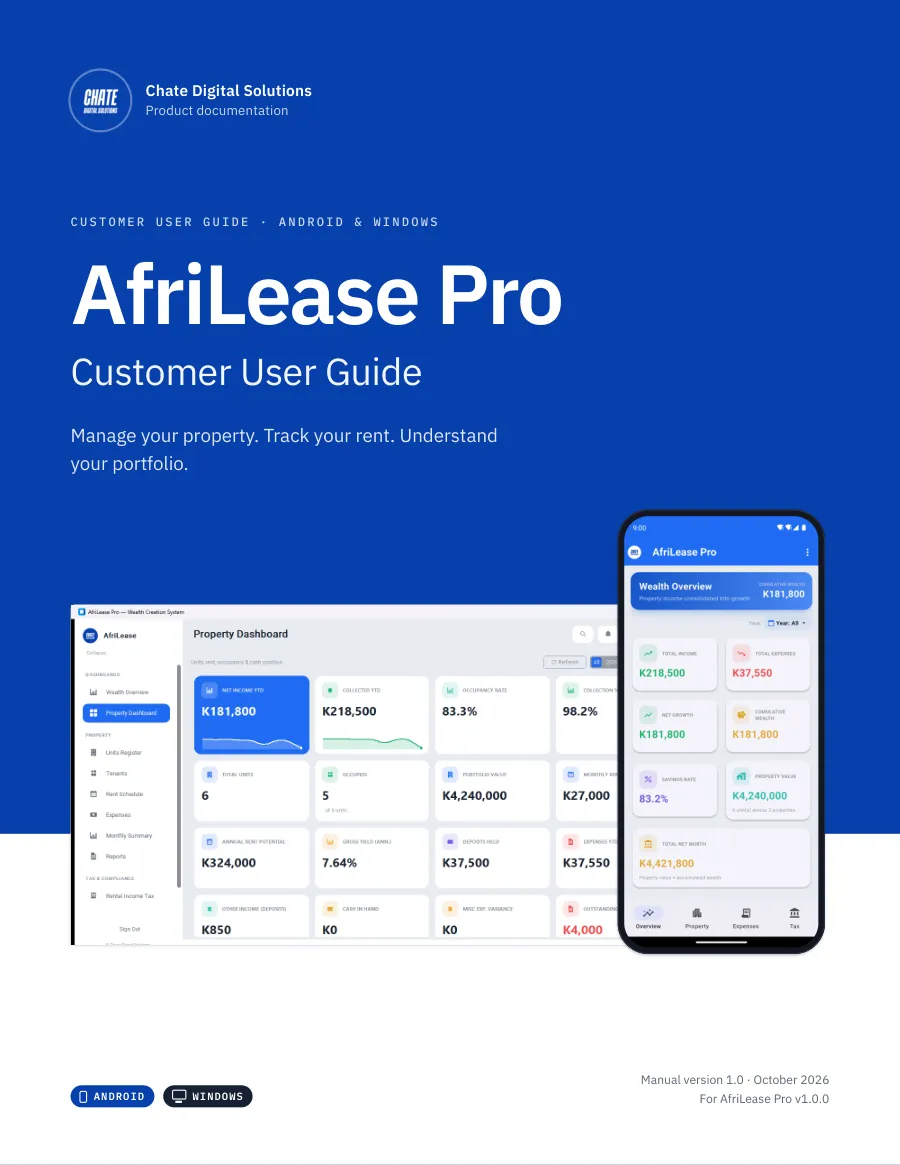
Cover of the AfriLease Pro Customer User Guide, manual version 1.0, October 2026

Product documentation

Prefer a complete guide?

Download the official AfriLease Pro Customer User Guide for Android and Windows. It takes you through setup, everyday property management, Rental Income Tax, reports, backups and administration step by step.

Android Windows One guide. Both versions.

AfriLease Pro

Customer User Guide

  • Android + Windows
  • Manual v1.0
  • October 2026
  • For AfriLease Pro v1.0.0

What’s inside

  • Getting started and initial setup
  • Properties, units and tenants
  • Recording rent and managing payments
  • Expenses, repairs and tenant exits
  • Rental Income Tax
  • Reports, backups and security

The guide also includes a dedicated Rental Income Tax chapter explaining how to use the tax workspace and related tools.

PDF · 15.7 MB · 86 pages

Document details
File
AfriLease-Pro-Customer-User-Guide-v1.0.pdf
Publisher
Chate Digital Solutions
SHA-256
b4cd18e9b631abec375e0afe15508661ca93fd414713073a513d929f3a63b944

Ready for the full version?

Ready to manage your rentals and tax calculations in one place?

Keep AfriLease Pro after your demo. When your seven days are up, WhatsApp Chate Digital Solutions. We’ll answer your questions, recommend the edition that fits your portfolio — Individual, Commercial or Enterprise — and help you get set up. You’ll be talking to our team in Lusaka.

Get the Full Version

WhatsApp or call 0978 643 800

No online payment · purchases are handled directly with our team

FAQ

AfriLease Pro questions, answered

Is the demo really free?

Yes. The demo is free for seven days and no payment is required to download it. There is no online checkout on this website.

How long does the trial last?

Seven days from the first time you open the app. After that the demo stops opening — WhatsApp us on 0978 643 800 to move to the full version.

Do I need a Google Play Store account?

No. The Android app is downloaded directly from Chate Digital Solutions, so no Google Play account is needed. Android will ask you to allow the install — see “How to install the Android APK” above.

Can I use AfriLease Pro on Windows?

Yes. Download the Windows installer, run it on your PC and sign in.

Can I use it on Android?

Yes. Download the APK to your Android phone and install it. The Android app also sends rent reminders as phone notifications.

Can I use it on both my PC and my phone?

Yes, you can install both. Each installation keeps its own records on that device — the Windows and Android apps do not sync with each other.

Where is my data stored?

On the PC or phone where AfriLease Pro is installed. There is no cloud account to create, and your property records are not sent to Chate Digital Solutions. On Windows you can back up to a location you choose.

Does AfriLease Pro calculate Rental Income Tax?

Yes. When the Rental Income Tax module is switched on, AfriLease Pro calculates the tax using the Zambia Rental Income Tax rules configured in the application and the rent you record as received. It also includes an estimator and deadline reminders. AfriLease Pro does not submit or pay your tax return to ZRA on your behalf — you file and pay through your own ZRA account.

Can I estimate Rental Income Tax without changing my rental records?

Yes. AfriLease Pro includes a separate built-in Rental Income Tax calculator for planning and what-if calculations. It works on any figure you type in and does not change your rental records.

Will AfriLease remind me when Rental Income Tax is due?

When the tax module is switched on, the Tax page counts down to the return date on both platforms, and on Android AfriLease Pro can send reminders to your phone as the date approaches (with notifications allowed). Keep your own note of the date as well — reminders help, but the return is still your responsibility.

Where do I get help?

Watch the Desktop or Mobile tutorial on this page, or WhatsApp Chate Digital Solutions on 0978 643 800 — you will be talking to our team in Lusaka.

How do I purchase the full version?

WhatsApp us on 0978 643 800. We will answer your questions and recommend the edition that fits your portfolio. Purchases are handled directly with our team, not through this website.

Is there an AfriLease Pro user guide?

Yes. The official Customer User Guide covers both Android and Windows, with step-by-step instructions from first setup through property management, rent, Rental Income Tax, reports, backups and administration.

View User Guide (PDF, opens in a new tab) Download User Guide (PDF, 15.7 MB)

Why do you ask for my contact details?

To provide and support your demo, help with installation or technical issues, and keep a record of demo downloads. We do not sell your information. Our privacy notice explains everything.

Try AfriLease Pro free for 7 days

Windows or Android · rent, tenants and Rental Income Tax tools · no payment required · local support from Chate Digital Solutions.